To plan a daily schedule with AI, provide the time you actually have, the commitments that cannot move, and realistic task estimates. Then check the proposed start and end times yourself. A tidy schedule is useful only if its work fits the available intervals.
This guide uses a fictional writing session on October 19, 2026, in Asia/Seoul time. The estimates are inputs for an editorial exercise, not measured productivity claims. No calendar events have been created from this example.
1. Separate available windows from free working time
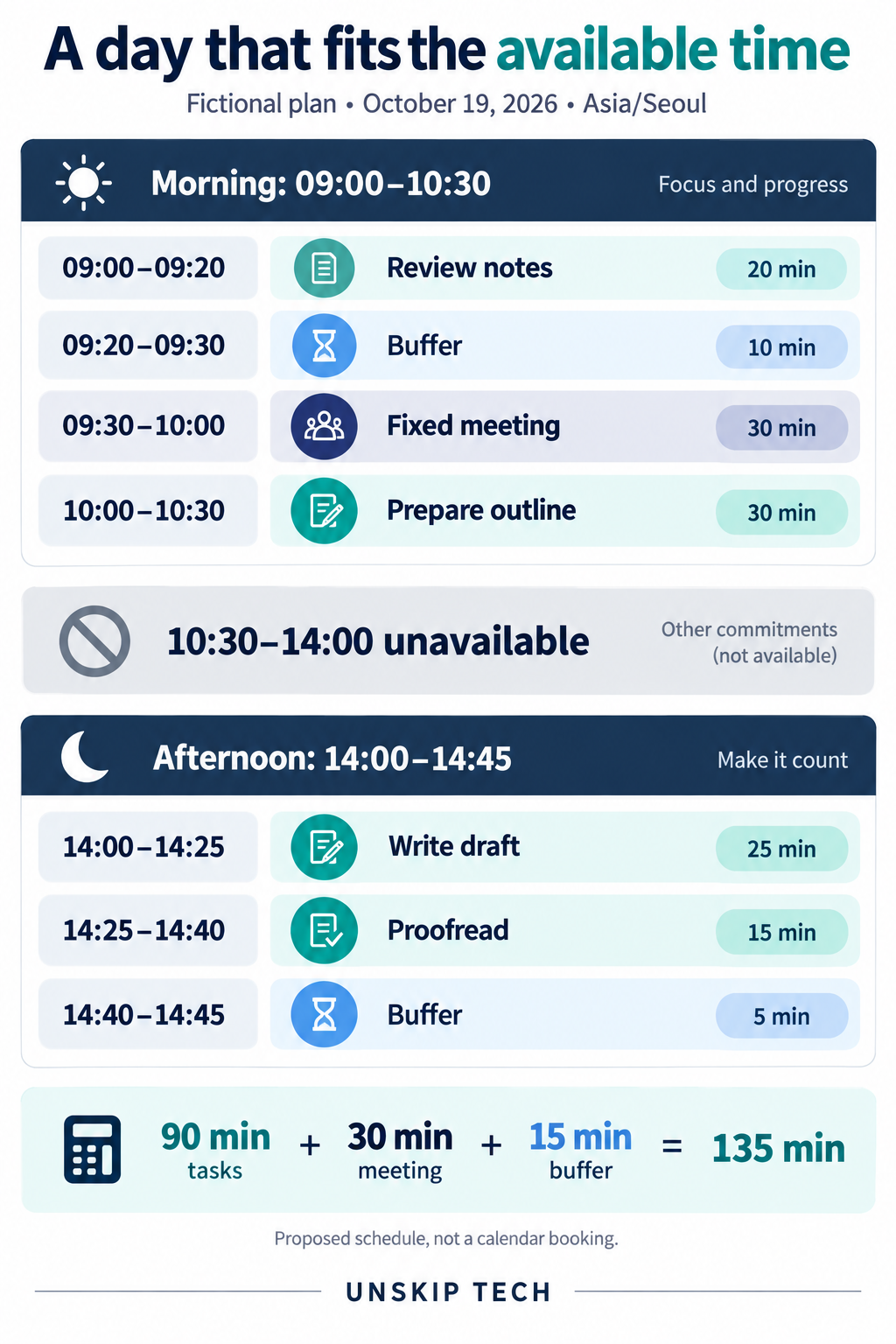
The person in our example is available from 09:00 to 10:30 and again from 14:00 to 14:45. A fixed meeting occupies 09:30 to 10:00. The rest of the day is unavailable; do not treat the gap between the two windows as spare capacity.
Available windows: 90 + 45 = 135 minutes
Fixed meeting: 30 minutes
Time left for tasks and buffers: 135 − 30 = 105 minutes
Record the date and time zone alongside the times. If you later enter shared events in Google Calendar, check the event time zone; Google’s time-zone guidance explains how calendar and event time zones work. A schedule written in chat does not by itself establish those settings.
2. Define task order and completion conditions
The example has four tasks that must happen in order:
- Review notes — 20 minutes. Finished when the points needed for the outline are identified.
- Prepare outline — 30 minutes, after reviewing the notes. Finished when the section order is ready for drafting.
- Write draft — 25 minutes, after the outline. Finished when each planned section has draft text.
- Proofread — 15 minutes, after the draft. Finished when the text has received the intended spelling and consistency pass.
The task estimates total 90 minutes, leaving 15 minutes for buffers. These numbers are assumptions supplied by the planner. AI should not quietly reduce a 30-minute task to 15 minutes to make the calendar look complete.
If your task list contains more work than the day can hold, decide what matters before arranging time blocks. Our AI decision-matrix guide shows one way to make competing priorities explicit.
3. Ask for a schedule and a capacity check
Plan this fictional day: October 19, 2026, Asia/Seoul time.

Available windows:
09:00–10:30 and 14:00–14:45.
All other times are unavailable.
Fixed meeting: 09:30–10:00. Do not move it.

Tasks in required order:
1. Review notes: 20 minutes
2. Prepare outline: 30 minutes, after task 1
3. Write draft: 25 minutes, after task 2
4. Proofread: 15 minutes, after task 3

Keep each task in one uninterrupted block.
Reserve 15 minutes total for buffers; the buffer may be split.
Do not shorten estimates, overlap activities, or use unavailable time.

Return:
- Start and end times for each activity
- Duration of each block
- A total for tasks, meeting, and buffers
- Any work that does not fit

Treat this as a proposed schedule, not a calendar booking.
The last line makes the status of the output clear. If you later want events created, review the proposed times and use the calendar’s own workflow. Do not assume a text-only planning answer has reserved anyone’s time.
4. Check the proposed day block by block
| Time | Activity | Minutes |
|---|---|---|
| 09:00–09:20 | Review notes | 20 |
| 09:20–09:30 | Buffer or short break | 10 |
| 09:30–10:00 | Fixed meeting | 30 |
| 10:00–10:30 | Prepare outline | 30 |
| 14:00–14:25 | Write draft | 25 |
| 14:25–14:40 | Proofread | 15 |
| 14:40–14:45 | Buffer | 5 |
The morning contains 20 minutes of review, 10 minutes of buffer, a 30-minute meeting, and a 30-minute outline: 90 minutes. The afternoon contains 25 minutes of drafting, 15 minutes of proofreading, and 5 minutes of buffer: 45 minutes.
Across both windows, the total is 90 minutes of tasks + 30 minutes of meeting + 15 minutes of buffer = 135 minutes. Each task follows its prerequisite, and no block crosses the meeting or extends beyond the available windows.
Check placement as well as the total. A plan can add up correctly while assigning the outline at 09:20–09:50, which would collide with the meeting. The task needs a continuous 30-minute slot, so its valid placement in this example is 10:00–10:30.
5. Replan when a task takes longer
Now imagine it is 14:00 and the draft is estimated to take 40 minutes instead of 25. The morning has already happened. The afternoon still contains only 45 available minutes.
Revised afternoon work:
Draft: 40 minutes
Proofread: 15 minutes
Remaining planned buffer: 5 minutes
Total requested: 60 minutes
Available: 45 minutes
Shortfall while preserving the buffer: 15 minutes
Even removing the five-minute afternoon buffer would leave 55 minutes of work in a 45-minute window. The remaining work cannot fit. The earlier ten-minute buffer is in the past and cannot be reassigned to rescue the afternoon.
One valid revision is to draft from 14:00 to 14:40 and keep 14:40–14:45 as buffer. Proofreading remains unscheduled and needs another confirmed 15-minute window. Do not invent a free slot tomorrow or label the draft as proofread.
If both tasks must be finished by 14:45, report that the current requirements conflict. The planner must change scope, obtain more time, or choose another authorized arrangement. A shorter draft may be an option, but its new scope and estimate need to be agreed rather than silently substituted.
6. Review what AI assumed
- Confirm that all fixed commitments are present and unchanged.
- Subtract meetings from available windows only once.
- Check every duration from its start and end time, not only the printed minute count.
- Look for overlaps, work outside available hours, and tasks placed before their prerequisites.
- Keep unscheduled work visible. A missing task is not a completed task.
- Check that buffers are still available at the point where the revised plan uses them.
For recurring work, record actual durations after the session and use them to improve later estimates. Keep planning estimates separate from completed time records. If a task was interrupted, note that context so the next estimate is not based on a misleading total.
A useful AI schedule makes the tradeoff explicit: what fits, what has to wait, and which assumptions could change the plan. The final check is whether the proposed day respects the time and task constraints you supplied.
Looking for an assistant to maintain that plan? Our Reclaim and Motion comparison covers recurring routines, automatic task placement, calendar synchronization, and a trial that checks available capacity and working-hour boundaries.